第 20 章:优先级排序
在复杂、多变的环境里,智能体往往同时面对大量候选行动、彼此拉扯的目标,以及紧缺的资源。若缺少清晰的「下一步」决策机制,系统就容易效率下滑、交付延误,甚至错失关键结果。优先级排序模式的作用,就是让智能体按重要性、紧迫性、依赖关系和既定准则,对任务、目标或行动进行排序,从而把有限精力投向真正要紧的事项,提升产出并与总体目标保持对齐。
优先级排序模式概览
智能体借助优先级排序来统筹任务、目标与子目标,并据此决定下一步行动。当多条需求同时出现时,这一机制能支持更有依据的取舍,让更重要或更紧迫的事项优先获得资源。在资源紧张、时间窗口有限、目标又可能彼此制约的现实条件下,这种能力几乎不可或缺。
典型的优先级管线通常包含四块。其一,准则定义:先为任务打分准备规则或量表,常见维度包括紧迫性(时间敏感度)、重要性(对主目标的贡献)、依赖关系(是否阻塞其他工作)、资源就绪度(工具与数据是否到位)、成本收益,以及面向个性化助理的用户偏好。其二,任务评估:把候选任务映射到这些准则上,方法可以从 if-else、加权评分,一直到由 LLM 做链式推理。其三,调度 / 选择逻辑:基于评分结果决定下一步动作或整条执行序列,可依托优先队列、规划器或混合策略。其四,动态重排:当突发事件出现、截止时间临近,或外部反馈到达时,系统要能实时调整排序,保持足够的弹性。
优先级既可用于挑选顶层目标,也可用于规划内部子步骤的先后,还可用于在动作空间中选出下一个即时操作。合理的排序机制,能让智能体在多目标、多约束场景中表现得更高效、更节省资源,也更具抗扰动能力。这一点很像人类团队里的项目经理,在综合各方输入后做出调度决策。
实际应用场景与用例
在现实业务里,智能体已经能相当成熟地运用优先级机制,在时限压力下做出兼顾风险与收益的决策。
- 自动化客户支持:将宕机、批量故障等紧急工单排在密码重置等例行事项之前,并可对高价值客户开启快速通道。
- 云计算:依据优先级在峰时为关键业务预留算力,把可延后的批处理挪到低谷,以压缩综合成本。
- 自动驾驶:实时重排动作优先级,安全相关决策(如紧急制动)始终优先于车道保持或节油策略。
- 金融交易:综合盘面状态、风险敞口、利润目标与实时资讯流为交易指令排序,确保高优先级机会优先执行。
- 项目管理:结合截止日、依赖链、人力负载与战略权重,为看板任务动态排序。
- 网络安全:按威胁等级、影响面与资产重要性为告警分级,让最危险的入侵线索最先得到处置。
- 个人助理:根据用户标注的重要性、临近日程与当下情境,重新排列提醒、待办与推送。
以上场景共同表明:是否具备有效的优先级排序能力,直接决定智能体能否在复杂情境中保持稳定表现,并作出可靠决策。
动手代码示例
以下示例基于 LangChain 搭建一个「项目经理」智能体:它可以创建任务、写入优先级并分派给虚拟成员,用来展示 LLM 与定制工具结合后,如何自动化跑通项目管理闭环。
import os
import asyncio
from typing import List, Optional, Dict, Type

from dotenv import load_dotenv
from pydantic import BaseModel, Field
from langchain_core.prompts import ChatPromptTemplate
from langchain_core.tools import Tool
from langchain_openai import ChatOpenAI
from langchain.agents import AgentExecutor, create_react_agent
from langchain.memory import ConversationBufferMemory

# --- 0. Configuration and Setup ---
# Loads the OPENAI_API_KEY from the .env file.
load_dotenv()

# The ChatOpenAI client automatically picks up the API key from the environment.
llm = ChatOpenAI(temperature=0.5, model="gpt-4o-mini")

# --- 1. Task Management System ---
class Task(BaseModel):
    """Represents a single task in the system."""
    id: str
    description: str
    priority: Optional[str] = None  # P0, P1, P2
    assigned_to: Optional[str] = None  # Name of the worker

class SuperSimpleTaskManager:
    """An efficient and robust in-memory task manager."""

    def __init__(self):
        # Use a dictionary for O(1) lookups, updates, and deletions.
        self.tasks: Dict[str, Task] = {}
        self.next_task_id = 1

    def create_task(self, description: str) -> Task:
        """Creates and stores a new task."""
        task_id = f"TASK-{self.next_task_id:03d}"
        new_task = Task(id=task_id, description=description)
        self.tasks[task_id] = new_task
        self.next_task_id += 1
        print(f"DEBUG: Task created - {task_id}: {description}")
        return new_task

    def update_task(self, task_id: str, **kwargs) -> Optional[Task]:
        """Safely updates a task using Pydantic's model_copy."""
        task = self.tasks.get(task_id)
        if task:
            # Use model_copy for type-safe updates.
            update_data = {k: v for k, v in kwargs.items() if v is not None}
            updated_task = task.model_copy(update=update_data)
            self.tasks[task_id] = updated_task
            print(f"DEBUG: Task {task_id} updated with {update_data}")
            return updated_task

        print(f"DEBUG: Task {task_id} not found for update.")
        return None

    def list_all_tasks(self) -> str:
        """Lists all tasks currently in the system."""
        if not self.tasks:
            return "No tasks in the system."

        task_strings = []
        for task in self.tasks.values():
            task_strings.append(
                f"ID: {task.id}, Desc: '{task.description}', "
                f"Priority: {task.priority or 'N/A'}, "
                f"Assigned To: {task.assigned_to or 'N/A'}"
            )
        return "Current Tasks:\n" + "\n".join(task_strings)

task_manager = SuperSimpleTaskManager()

# --- 2. Tools for the Project Manager Agent ---
# Use Pydantic models for tool arguments for better validation and clarity.
class CreateTaskArgs(BaseModel):
    description: str = Field(description="A detailed description of the task.")

class PriorityArgs(BaseModel):
    task_id: str = Field(description="The ID of the task to update, e.g., 'TASK-001'.")
    priority: str = Field(description="The priority to set. Must be one of: 'P0', 'P1', 'P2'.")

class AssignWorkerArgs(BaseModel):
    task_id: str = Field(description="The ID of the task to update, e.g., 'TASK-001'.")
    worker_name: str = Field(description="The name of the worker to assign the task to.")

def create_new_task_tool(description: str) -> str:
    """Creates a new project task with the given description."""
    task = task_manager.create_task(description)
    return f"Created task {task.id}: '{task.description}'."

def assign_priority_to_task_tool(task_id: str, priority: str) -> str:
    """Assigns a priority (P0, P1, P2) to a given task ID."""
    if priority not in ["P0", "P1", "P2"]:
        return "Invalid priority. Must be P0, P1, or P2."
    task = task_manager.update_task(task_id, priority=priority)
    return f"Assigned priority {priority} to task {task.id}." if task else f"Task {task_id} not found."

def assign_task_to_worker_tool(task_id: str, worker_name: str) -> str:
    """Assigns a task to a specific worker."""
    task = task_manager.update_task(task_id, assigned_to=worker_name)
    return f"Assigned task {task.id} to {worker_name}." if task else f"Task {task_id} not found."

# All tools the PM agent can use
pm_tools = [
    Tool(
        name="create_new_task",
        func=create_new_task_tool,
        description="Use this first to create a new task and get its ID.",
        args_schema=CreateTaskArgs
    ),
    Tool(
        name="assign_priority_to_task",
        func=assign_priority_to_task_tool,
        description="Use this to assign a priority to a task after it has been created.",
        args_schema=PriorityArgs
    ),
    Tool(
        name="assign_task_to_worker",
        func=assign_task_to_worker_tool,
        description="Use this to assign a task to a specific worker after it has been created.",
        args_schema=AssignWorkerArgs
    ),
    Tool(
        name="list_all_tasks",
        func=task_manager.list_all_tasks,
        description="Use this to list all current tasks and their status."
    ),
]

# --- 3. Project Manager Agent Definition ---
pm_prompt_template = ChatPromptTemplate.from_messages([
    ("system", """You are a focused Project Manager LLM agent. Your goal is to manage project tasks efficiently.
      When you receive a new task request, follow these steps:
    1.  First, create the task with the given description using the `create_new_task` tool. You must do this first to get a `task_id`.
    2.  Next, analyze the user's request to see if a priority or an assignee is mentioned.
        - If a priority is mentioned (e.g., "urgent", "ASAP", "critical"), map it to P0. Use `assign_priority_to_task`.
        - If a worker is mentioned, use `assign_task_to_worker`.
    3.  If any information (priority, assignee) is missing, you must make a reasonable default assignment (e.g., assign P1 priority and assign to 'Worker A').
    4.  Once the task is fully processed, use `list_all_tasks` to show the final state.

    Available workers: 'Worker A', 'Worker B', 'Review Team'
    Priority levels: P0 (highest), P1 (medium), P2 (lowest)
    """),
    ("placeholder", "{chat_history}"),
    ("human", "{input}"),
    ("placeholder", "{agent_scratchpad}")
])

# Create the agent executor
pm_agent = create_react_agent(llm, pm_tools, pm_prompt_template)
pm_agent_executor = AgentExecutor(
    agent=pm_agent,
    tools=pm_tools,
    verbose=True,
    handle_parsing_errors=True,
    memory=ConversationBufferMemory(memory_key="chat_history", return_messages=True)
)

# --- 4. Simple Interaction Flow ---
async def run_simulation():
    print("--- Project Manager Simulation ---")

    # Scenario 1: Handle a new, urgent feature request
    print("\n[User Request] I need a new login system implemented ASAP. It should be assigned to Worker B.")
    await pm_agent_executor.ainvoke({"input": "Create a task to implement a new login system. It's urgent and should be assigned to Worker B."})

    print("\n" + "-" * 60 + "\n")

    # Scenario 2: Handle a less urgent content update with fewer details
    print("[User Request] We need to review the marketing website content.")
    await pm_agent_executor.ainvoke({"input": "Manage a new task: Review marketing website content."})

    print("\n--- Simulation Complete ---")

# Run the simulation
if __name__ == "__main__":
asyncio.run(run_simulation())该示例以 Python + LangChain 搭建一个轻量任务管理系统,模拟由大模型驱动的项目经理智能体。
系统通过 SuperSimpleTaskManager 在内存中维护任务表,并借助字典实现 O(1) 级别的增删改查。Task 模型封装了 ID、描述、可选优先级(P0/P1/P2)与可选经办人。内存占用会因任务类型、成员数量及其他因素而异。对外则暴露创建、更新和全量列举等接口。整体实现很轻,但已经足够演示优先级调度的基本流程。
智能体通过一组工具驱动任务后台,包括新建任务、写入优先级、绑定执行人和导出任务列表。每个工具都绑定到同一个 SuperSimpleTaskManager 实例,参数结构则由 Pydantic 约束,以减少幻觉式调用。
AgentExecutor 组合了基座模型、工具集与 ConversationBufferMemory,用来维持多轮上下文。ChatPromptTemplate 则把智能体行为约束为「先建单,再补全优先级与执行人,最后回显总表」,并在字段缺失时回落到默认策略(如 P1 + Worker A)。
run_simulation 以异步方式串起两个场景:一是「高优先级 + 指定执行人」的完整需求,二是信息稀疏的一般需求。verbose=True 会把 ReAct 轨迹打印到控制台,便于观察排序与工具调用链路。
要点速览
是什么: 在复杂环境里,智能体需要在海量候选动作、彼此冲突的目标,以及刚性的资源约束之间做取舍。缺乏显式优先级策略时,系统很容易陷入低效空转或错失窗口,轻则拖慢运营,重则完不成主目标。本质难题在于,如何压缩决策空间,让每一步都服务于全局意图。
为什么: 优先级模式把「怎么排」沉淀成一套可复用流程:先定义紧迫性、重要性、依赖关系、资源成本等维度,再对候选动作逐一打分,挑出当下最值得推进的一条路径。这样一来,系统就能在环境扰动下快速重排,并把稀缺资源投向收益最大的环节,整体行为也会更贴近战略诉求。
经验法则: 只要智能体需要在资源上限内自治地处理多条任务或目标,而这些任务、目标之间又可能彼此冲突,同时系统还必须持续适应动态环境,就应显式引入优先级排序模式。
图示摘要:
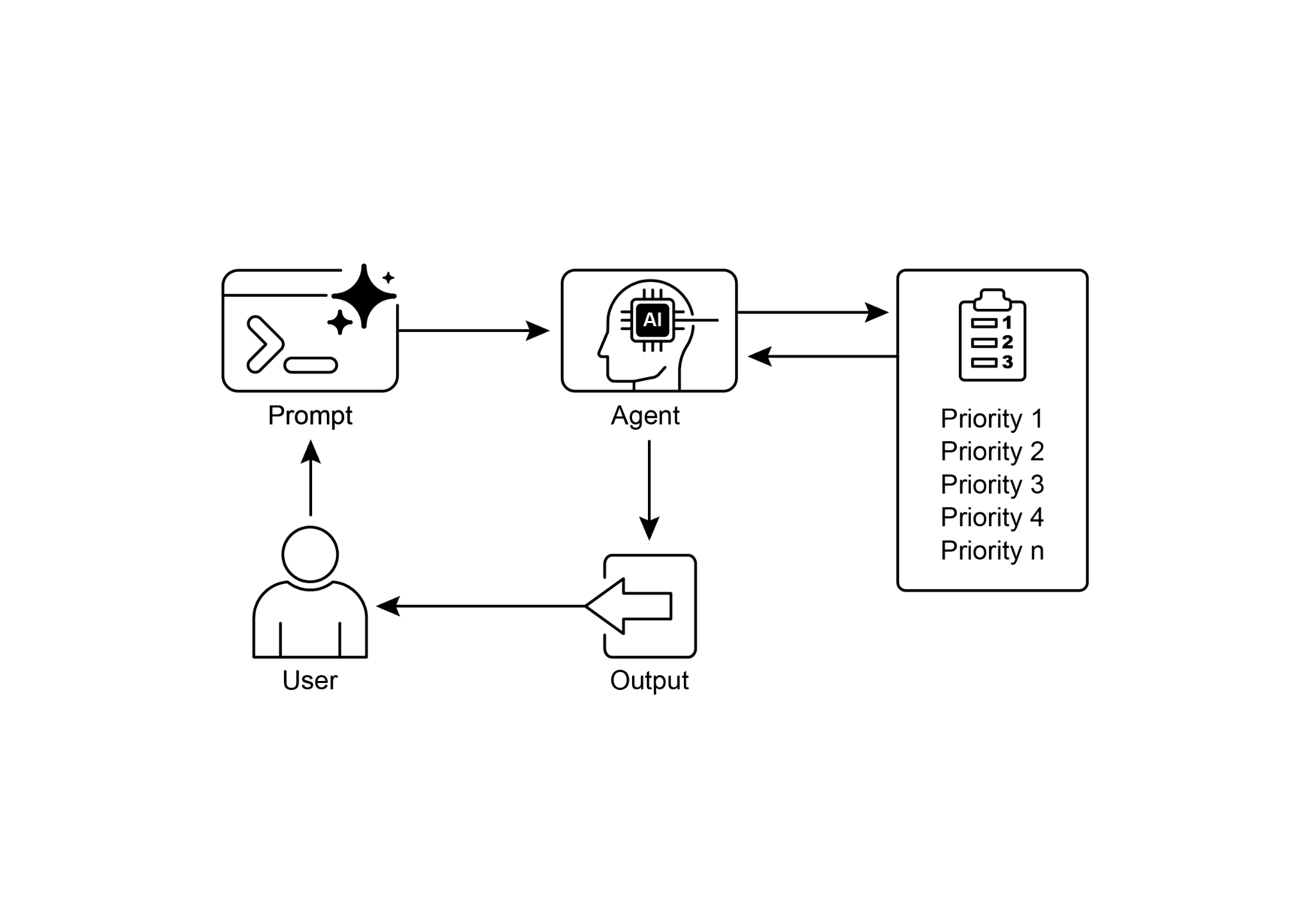
图 1:优先级排序设计模式(示意)
关键要点
- 优先级是智能体在复杂多目标场景中保持效能的底层能力。
- 典型排序依据包括紧迫性、重要性、依赖链和资源成本等可量化或可规则化的准则。
- 动态重排让系统能随着实时事件切换焦点,而不是死守初始计划。
- 优先级既作用于战略层(选目标),也作用于战术层(选下一步动作)。
- 良好的排序策略会直接提升吞吐、稳定性,以及对突发状况的承受力。
结论
总之,优先级模式几乎可以看作智能体系统的「调度内核」:即使处于复杂多变的环境中,系统也能围绕明确目标展开行动,自主处理冲突需求,决定有限资源该投向哪里,并给出可追溯的排序依据。相比线性脚本,这种能力更接近具备战略判断的调度机制。通过对紧迫性、重要性和依赖关系的综合权衡,系统得以展现出更成熟的决策能力。
其中尤为关键的是 动态重排:当外部条件突变时,智能体可以即时改写待办队列。示例代码也展示了智能体如何解析含糊需求、挑选工具,并按 ReAct 顺序执行。这种自我编排工作流的能力,正是智能体区别于一次性脚本的分水岭。想交付能在真实世界长期运转的智能体,优先级思维几乎是必修课。
参考资料
- 审视项目管理中人工智能的安全性:信息系统项目中 AI 驱动项目调度与资源分配的案例研究;https://www.irejournals.com/paper-details/1706160
- 敏捷软件项目管理中的 AI 驱动决策支持系统:增强风险缓解与资源分配;https://www.mdpi.com/2079-8954/13/3/208