第 7 章:多智能体协作
单体智能体架构在边界清晰的问题上往往行之有效,但面对复杂、跨领域任务时,能力很快就会触及瓶颈。多智能体协作模式(Multi-Agent Collaboration)通过把系统组织成一组彼此配合、各有专长的智能体,来化解这些局限。其前提是任务分解:先把高层目标拆成若干子问题,再分别交给在工具、数据访问或推理能力上最合适的智能体。
例如,一个复杂研究任务可以拆成几部分:研究智能体负责检索,数据分析智能体负责统计处理,综合智能体负责撰写最终报告。此类系统的成效不仅来自分工,更取决于智能体之间的通信机制:需要标准化的协议和共享语义,使它们能够交换数据、委派子任务并协调行动,从而保证最终产出连贯一致。
这种分布式架构带来更高的模块化、可扩展性与鲁棒性:单个智能体失效未必会拖垮整个系统。协作还能形成协同效应,使多智能体系统的整体表现超出任一单体的能力上限。
多智能体协作模式概览
多智能体协作模式(Multi-Agent Collaboration),是指设计一个由多个独立或半独立智能体,协同达成共同目标的系统。各智能体通常有清晰的角色、与总体目标对齐的子目标,并可调用不同的工具或知识库。该模式的力量,来自智能体之间的交互与协同效应。
协作可呈现多种形式:
- 顺序交接: 某个智能体完成任务后,将输出交给下一个智能体,推动流水线进入下一步(与规划模式相近,但明确涉及多个智能体)。
- 并行处理: 多个智能体同时处理问题的不同片段,随后再合并结果。
- 辩论与共识: 持有不同视角与信息源的智能体,通过
讨论评估备选项,最终形成共识,或做出信息更充分、判断更周全的决策。 - 层级结构:
管理者智能体,可根据下属的工具或插件能力动态分派任务并汇总结果;各智能体也可分管部分工具,避免由单一智能体包揽全部工具。 - 专家团队: 具备不同领域专长的智能体(如研究、写作、编辑)协作产出复杂成果。
- 批评者—审阅者: 一组智能体先产出初稿(计划、草稿或答复),另一组再从政策遵循、安全、合规、正确性、质量以及与组织目标是否一致等维度进行审阅;最后由原作者或终审智能体据反馈修订。该模式特别适用于代码生成、研究写作、逻辑校验与伦理对齐等场景,有助于提升鲁棒性与输出质量,并降低幻觉与差错风险。
多智能体系统(见图 1)在结构上至少包含三个关键要素:明确各智能体的角色与职责、建立信息交换通道,以及制定协作所遵循的任务流或交互协议。
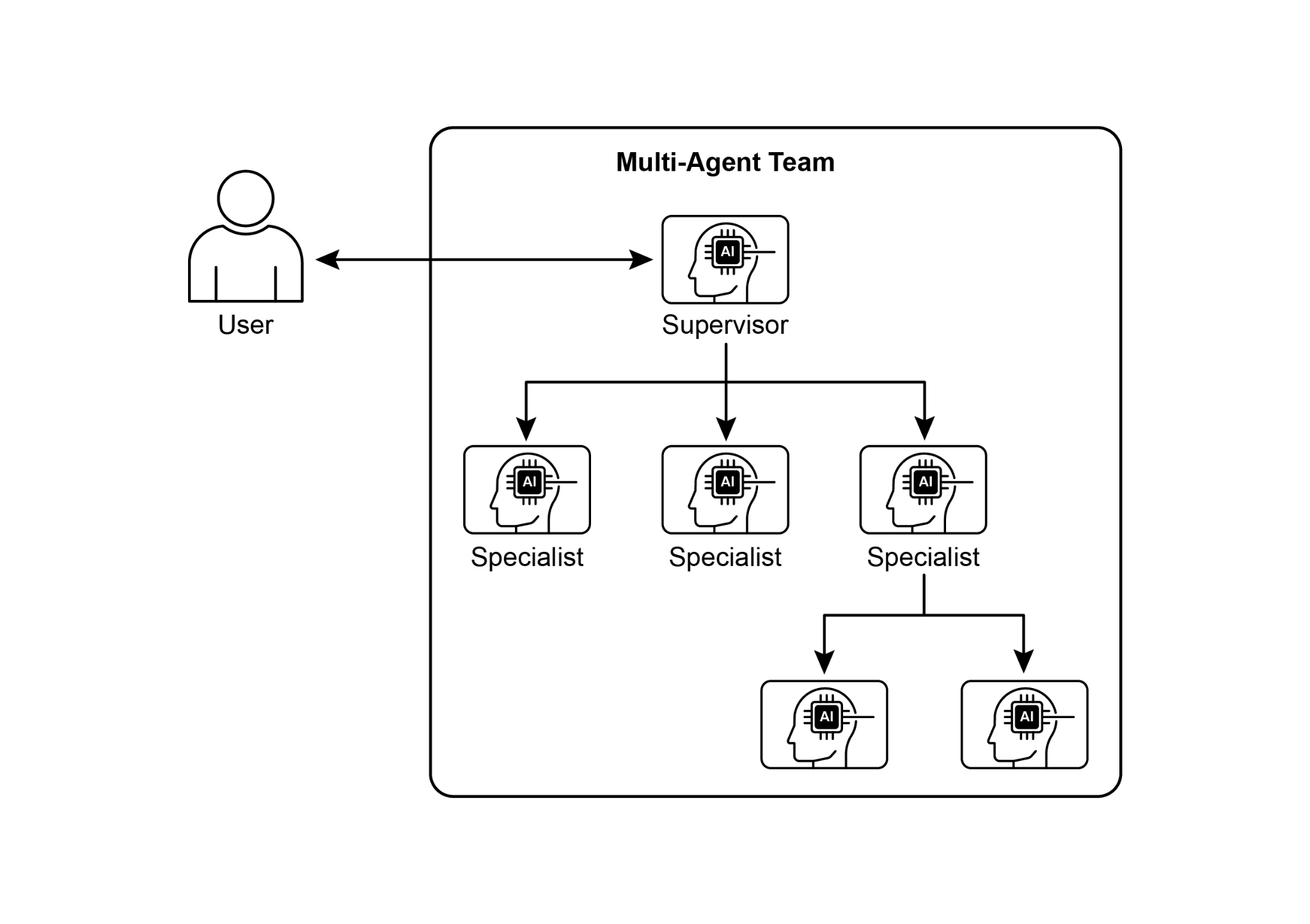
图 1:多智能体系统示意。
Crew AI、Google ADK 等框架为描述智能体、任务及其交互流程提供了结构化能力,从而支撑这一范式。它尤其适用于需要多种专业知识、包含多个相对独立阶段,或希望利用并发执行与跨智能体交叉验证的场景。
实际应用与用例
多智能体协作在许多领域都很有价值:
- 复杂研究与分析: 多智能体可以像人类研究团队一样分工,分别负责学术库检索、文献摘要、趋势研判和报告整合。
- 软件开发: 可以由需求分析、代码生成、测试、文档等智能体顺序传递产出,共同构建和验证组件。
- 创意内容生成: 一个营销活动可以由市场调研、文案、平面设计(借助图像生成工具)和社交媒体排期等智能体协同完成。
- 金融分析: 不同智能体可以分别专注于行情拉取、新闻情绪分析、技术分析和投资建议。
- 客服升级: 一线智能体先处理常规咨询,再把复杂问题逐级交给技术或账务专家智能体。
- 供应链优化: 以智能体分别代表供应商、制造商、分销商等节点,协同优化库存、物流与排期,以响应需求波动或突发扰动。
- 网络分析与修复: 自主运维尤其适合采用智能体架构来定位故障;多智能体可协作完成分诊、给出修复建议并推荐最优动作,也可以与传统机器学习模型和运维工具集成,在复用既有系统的同时发挥生成式 AI 的优势。
通过清晰划分专业化智能体并合理编排其协作关系,开发者可以构建出模块化程度更高、更易扩展,也能应对单一整合式智能体难以胜任之复杂问题的系统。
多智能体协作:探索相互关系与通信结构
理解智能体如何交互与通信,是设计高效多智能体系统的基础。如图 2 所示,从最简单的单智能体,到复杂的定制化协作框架,关系/协作结构与通信方式构成了一条从简到繁的谱系;不同模型各有优劣,并共同影响系统的效率、鲁棒性与适应性。
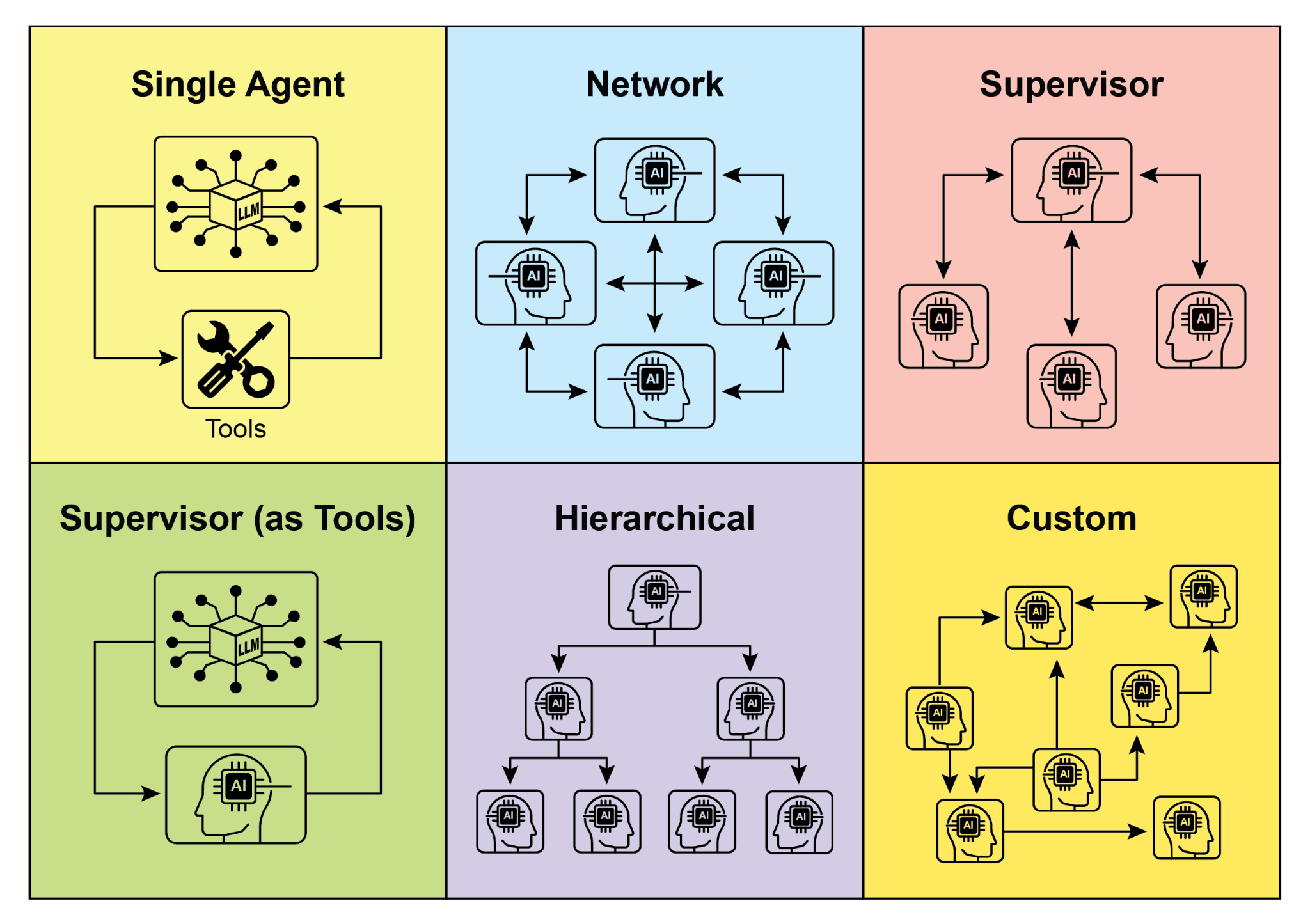
图 2:智能体以多种拓扑与机制进行通信与交互。
1. 单智能体
在最基础的形态下,「单智能体」自主运行,不与其他实体直接交互或通信。它实现和管理成本较低,但能力受单体范围与资源限制。适用于那些可以拆成彼此独立子问题、且每个子问题都能由单个智能体独立完成的任务。
2. 网络
「网络」模型标志着向协作迈进的重要一步:多智能体以去中心化方式互联,通常通过点对点通信共享信息、资源,甚至分配任务。单点失效未必会瘫痪全局,因此系统更具韧性。但在规模庞大、拓扑松散的网络中,控制通信开销并维持决策一致性仍然很有挑战。
3. 监督者
「监督者」模型由一个专职监督智能体统筹下属群体,充当通信、任务分派和冲突调解的中心枢纽。这种层级结构权责清晰、便于管理,但监督者本身也会带来单点故障风险;当下属数量很多或任务非常复杂时,它还可能成为性能瓶颈。
4. 作为工具的监督者
这是对「监督者」角色的进一步延伸:监督者不再主要负责直接指挥,而是更多地向其他智能体提供资源、指导或分析支持(如工具、数据、算力等),未必干预每一步行动。这样做是为了发挥监督者的能力优势,同时避免过于僵化的自上而下控制。
5. 层级结构
「层级」模型将监督关系扩展为多层组织:高层监督低层,最底层则是执行型智能体集群。它适用于那些可以递归分解、并由不同层级分别承接的复杂问题,为扩展性和复杂度管理提供了结构化路径,同时在既定边界内保留分布式决策空间。
6. 定制
「定制」模型代表了多智能体系统设计中的最高灵活度:可以针对具体问题或应用场景量身构建关系与通信拓扑,既可以组合前述模型的要素,也可以依据环境约束与机会从零设计。它通常用于优化关键性能指标、适应高度动态的环境,或把领域知识直接嵌入系统架构。设计和实现这类模型,往往需要对多智能体系统原理有深入理解,并对通信协议、协调机制与涌现行为作出审慎权衡。
总之,为多智能体系统选择何种关系结构与通信模型,是一项关键的设计决策。每种模型都有各自的优势与局限,而最优选择取决于任务复杂度、智能体数量、期望的自主程度、对鲁棒性的要求,以及可接受的通信开销。未来,多智能体系统的发展很可能会继续探索并完善这些模型,同时催生新的协作智能范式。
动手代码示例(Crew AI)
该 Python 示例借助 CrewAI 组建了一支 Crew,用于生成关于 AI 趋势的博客文章:先配置运行环境并从 .env 读取 API 密钥;随后定义两名核心智能体,研究员负责检索并汇总趋势,作者根据研究结果撰写博文;任务与角色一一对应,且写作任务显式依赖研究任务的输出;最后将二者编入 Crew,设定为顺序执行流程,并在 main 中通过 kickoff() 编排协作,输出最终博文。
import os
from dotenv import load_dotenv
from crewai import Agent, Task, Crew, Process
from langchain_google_genai import ChatGoogleGenerativeAI

def setup_environment():
    """Loads environment variables and checks for the required API key."""
    load_dotenv()
    if not os.getenv("GOOGLE_API_KEY"):
        raise ValueError("GOOGLE_API_KEY not found. Please set it in your .env file.")

def main():
    """
    Initializes and runs the AI crew for content creation using the latest Gemini model.
    """
    setup_environment()

    # Define the language model to use.
    # Updated to a model from the Gemini 2.0 series for better performance and features.
    # For cutting-edge (preview) capabilities, you could use "gemini-2.5-flash".
    llm = ChatGoogleGenerativeAI(model="gemini-2.0-flash")

    # Define Agents with specific roles and goals
    researcher = Agent(
        role='Senior Research Analyst',
        goal='Find and summarize the latest trends in AI.',
        backstory="You are an experienced research analyst with a knack for identifying key trends and synthesizing information.",
        verbose=True,
        allow_delegation=False,
    )

    writer = Agent(
        role='Technical Content Writer',
        goal='Write a clear and engaging blog post based on research findings.',
        backstory="You are a skilled writer who can translate complex technical topics into accessible content.",
        verbose=True,
        allow_delegation=False,
    )

    # Define Tasks for the agents
    research_task = Task(
        description="Research the top 3 emerging trends in Artificial Intelligence in 2024-2025. Focus on practical applications and potential impact.",
        expected_output="A detailed summary of the top 3 AI trends, including key points and sources.",
        agent=researcher,
    )

    writing_task = Task(
        description="Write a 500-word blog post based on the research findings. The post should be engaging and easy for a general audience to understand.",
        expected_output="A complete 500-word blog post about the latest AI trends.",
        agent=writer,
        context=[research_task],
    )

    # Create the Crew
    blog_creation_crew = Crew(
        agents=[researcher, writer],
        tasks=[research_task, writing_task],
        process=Process.sequential,
        llm=llm,
        verbose=2,  # Set verbosity for detailed crew execution logs
    )

    # Execute the Crew
    print("## Running the blog creation crew with Gemini 2.0 Flash... ##")
    try:
        result = blog_creation_crew.kickoff()
        print("\n------------------\n")
        print("## Crew Final Output ##")
        print(result)
    except Exception as e:
        print(f"\nAn unexpected error occurred: {e}")

if __name__ == "__main__":
main()下文将继续介绍 Google ADK 中的示例,重点覆盖层级、并行和顺序等协调范式,并演示如何把智能体封装成可调用工具。
动手代码示例(Google ADK)
以下示例演示如何在 Google ADK 中通过父子关系搭建层级智能体:一方面定义 LlmAgent,另一方面实现一个继承 BaseAgent 的 TaskExecutor(本例面向非 LLM 任务,只产出「任务成功完成」事件)。随后分别实例化 greeter 与 task_doer,并以 coordinator 作为父智能体,在指令中要求它把问候委派给 greeter、把任务执行委派给 task_doer。最后通过断言验证父子关系,并打印层级创建成功的提示。
from typing import AsyncGenerator

from google.adk.agents import LlmAgent, BaseAgent
from google.adk.agents.invocation_context import InvocationContext
from google.adk.events import Event

# Correctly implement a custom agent by extending BaseAgent
class TaskExecutor(BaseAgent):
    """A specialized agent with custom, non-LLM behavior."""
    name: str = "TaskExecutor"
    description: str = "Executes a predefined task."

    async def _run_async_impl(self, context: InvocationContext) -> AsyncGenerator[Event, None]:
        """Custom implementation logic for the task."""
        # This is where your custom logic would go.
        # For this example, we'll just yield a simple event.
        yield Event(author=self.name, content="Task finished successfully.")

# Define individual agents with proper initialization
# LlmAgent requires a model to be specified.
greeter = LlmAgent(
    name="Greeter",
    model="gemini-2.0-flash-exp",
    instruction="You are a friendly greeter.",
)

# Instantiate our concrete custom agent
task_doer = TaskExecutor()

# Create a parent agent and assign its sub-agents
# The parent agent's description and instructions should guide its delegation logic.
coordinator = LlmAgent(
    name="Coordinator",
    model="gemini-2.0-flash-exp",
    description="A coordinator that can greet users and execute tasks.",
    instruction="When asked to greet, delegate to the Greeter. When asked to perform a task, delegate to the TaskExecutor.",
    sub_agents=[
        greeter,
        task_doer,
    ],
)

# The ADK framework automatically establishes the parent-child relationships.
# These assertions will pass if checked after initialization.
assert greeter.parent_agent == coordinator
assert task_doer.parent_agent == coordinator

print("Agent hierarchy created successfully.")该片段展示如何在 Google ADK 中使用 LoopAgent 构造迭代工作流:ConditionChecker 读取会话状态中的 status,若为 completed,则触发 escalate 动作以结束循环,否则继续下一轮;ProcessingStep 是一个 LlmAgent,其指令要求在最后一步将 status 置为 completed;名为 StatusPoller 的 LoopAgent 将 max_iterations 设为 10,子智能体会按顺序反复执行,直到条件满足或达到迭代上限。
import asyncio
from typing import AsyncGenerator

from google.adk.agents import LoopAgent, LlmAgent, BaseAgent
from google.adk.events import Event, EventActions
from google.adk.agents.invocation_context import InvocationContext

# Best Practice: Define custom agents as complete, self-describing classes.
class ConditionChecker(BaseAgent):
    """A custom agent that checks for a 'completed' status in the session state."""
    name: str = "ConditionChecker"
    description: str = "Checks if a process is complete and signals the loop to stop."

    async def _run_async_impl(
        self, context: InvocationContext
    ) -> AsyncGenerator[Event, None]:
        """Checks state and yields an event to either continue or stop the loop."""
        status = context.session.state.get("status", "pending")
        is_done = status == "completed"

        if is_done:
            # Escalate to terminate the loop when the condition is met.
            yield Event(author=self.name, actions=EventActions(escalate=True))
        else:
            # Yield a simple event to continue the loop.
            yield Event(author=self.name, content="Condition not met, continuing loop.")

# Correction: The LlmAgent must have a model and clear instructions.
process_step = LlmAgent(
    name="ProcessingStep",
    model="gemini-2.0-flash-exp",
    instruction=(
        "You are a step in a longer process. Perform your task. "
        "If you are the final step, update session state by setting 'status' to 'completed'."
    ),
)

# The LoopAgent orchestrates the workflow.
poller = LoopAgent(
    name="StatusPoller",
    max_iterations=10,
    sub_agents=[
        process_step,
        ConditionChecker(),  # Instantiating the well-defined custom agent.
    ],
)

# This poller will now execute 'process_step'
# and then 'ConditionChecker' repeatedly until the status is 'completed'
# or 10 iterations have passed.该片段说明 Google ADK 中由 SequentialAgent 构成的线性流水线:Step1_Fetch 将输出写入 session.state["data"];Step2_Process 再依据状态中的数据生成摘要;MyPipeline 负责按顺序编排子智能体,使前一步产出成为后一步输入。这种模式广泛见于多步 AI 或数据处理流水线。
from google.adk.agents import SequentialAgent, Agent

# This agent's output will be saved to session.state["data"]
step1 = Agent(
    name="Step1_Fetch",
    output_key="data",
)

# This agent will use the data from the previous step.
# We instruct it on how to find and use this data.
step2 = Agent(
    name="Step2_Process",
    instruction="Analyze the information found in state['data'] and provide a summary.",
)

pipeline = SequentialAgent(
    name="MyPipeline",
    sub_agents=[step1, step2],
)

# When the pipeline is run with an initial input, Step1 will execute,
# its response will be stored in session.state["data"], and then
# Step2 will execute, using the information from the state as instructed.以下示例展示 ParallelAgent 如何并发调度多路任务:data_gatherer 同时驱动 weather_fetcher 与 news_fetcher,分别将结果写入 session.state["weather_data"] 和 session.state["news_data"];两个子智能体都配置为 gemini-2.0-flash-exp;运行结束后,可从 final_state 汇总读取两侧产出(示意性片段)。
from google.adk.agents import Agent, ParallelAgent

# It's better to define the fetching logic as tools for the agents.
# For simplicity in this example, we'll embed the logic in the agent's instruction.
# In a real-world scenario, you would use tools.

# Define the individual agents that will run in parallel
weather_fetcher = Agent(
    name="weather_fetcher",
    model="gemini-2.0-flash-exp",
    instruction="Fetch the weather for the given location and return only the weather report.",
    output_key="weather_data",  # The result will be stored in session.state["weather_data"]
)

news_fetcher = Agent(
    name="news_fetcher",
    model="gemini-2.0-flash-exp",
    instruction="Fetch the top news story for the given topic and return only that story.",
    output_key="news_data",  # The result will be stored in session.state["news_data"]
)

# Create the ParallelAgent to orchestrate the sub-agents
data_gatherer = ParallelAgent(
    name="data_gatherer",
    sub_agents=[
        weather_fetcher,
        news_fetcher,
    ],
)该段展示 Google ADK 中的「智能体即工具」范式:父级 artist_agent 与专门生成图像的子智能体 image_generator_agent 协同工作;generate_image 用模拟数据返回图像字节;artist_agent 先生成创意提示,再通过 AgentTool 调用 image_generator_agent;下层智能体调用工具并回传(模拟)图像数据,体现出由高层编排、低层专职承接的分层结构。
from google.adk.agents import LlmAgent
from google.adk.tools import agent_tool
from google.genai import types

# 1. A simple function tool for the core capability.
# This follows the best practice of separating actions from reasoning.
def generate_image(prompt: str) -> dict:
    """
    Generates an image based on a textual prompt.

    Args:
        prompt: A detailed description of the image to generate.

    Returns:
        A dictionary with the status and the generated image bytes.
    """
    print(f"TOOL: Generating image for prompt: '{prompt}'")
    # In a real implementation, this would call an image generation API.
    # For this example, we return mock image data.
    mock_image_bytes = b"mock_image_data_for_a_cat_wearing_a_hat"
    return {
        "status": "success",
        # The tool returns the raw bytes, the agent will handle the Part creation.
        "image_bytes": mock_image_bytes,
        "mime_type": "image/png",
    }

# 2. Refactor the ImageGeneratorAgent into an LlmAgent.
# It now correctly uses the input passed to it.
image_generator_agent = LlmAgent(
    name="ImageGen",
    model="gemini-2.0-flash",
    description="Generates an image based on a detailed text prompt.",
    instruction=(
        "You are an image generation specialist. Your task is to take the user's request "
        "and use the `generate_image` tool to create the image. "
        "The user's entire request should be used as the 'prompt' argument for the tool. "
        "After the tool returns the image bytes, you MUST output the image."
    ),
    tools=[generate_image],
)

# 3. Wrap the corrected agent in an AgentTool.
# The description here is what the parent agent sees.
image_tool = agent_tool.AgentTool(
    agent=image_generator_agent,
    description="Use this tool to generate an image. The input should be a descriptive prompt of the desired image.",
)

# 4. The parent agent remains unchanged. Its logic was correct.
artist_agent = LlmAgent(
    name="Artist",
    model="gemini-2.0-flash",
    instruction=(
        "You are a creative artist. First, invent a creative and descriptive prompt for an image. "
        "Then, use the `ImageGen` tool to generate the image using your prompt."
    ),
    tools=[image_tool],
)速览
是什么: 复杂问题往往超出单体 LLM 智能体的能力边界。单一智能体可能缺少完成多面任务所需的专精技能或工具权限,从而形成瓶颈,拖累整体效能与可扩展性,使跨领域的复杂目标难以高效完成,结果也容易不理想。
为什么: 多智能体协作模式提供了一种可复用的典型思路:先把复杂问题拆成更小的单元,再分别交给具备相应工具与能力的专精智能体处理;这些智能体再通过统一的通信协议,以顺序交接、并行工作流或层级委派等方式协同。这样就能形成整体大于部分之和的效果,完成任何单体都难以独立完成的任务。
经验法则: 当任务对单一智能体来说过于复杂,且可以拆成依赖不同技能或工具的子任务时,就适合采用这一模式。它尤其适用于需要多元专长、并行加速或多阶段结构化流程的场景,例如复杂研究分析、软件开发或创意内容生产。
图示摘要:
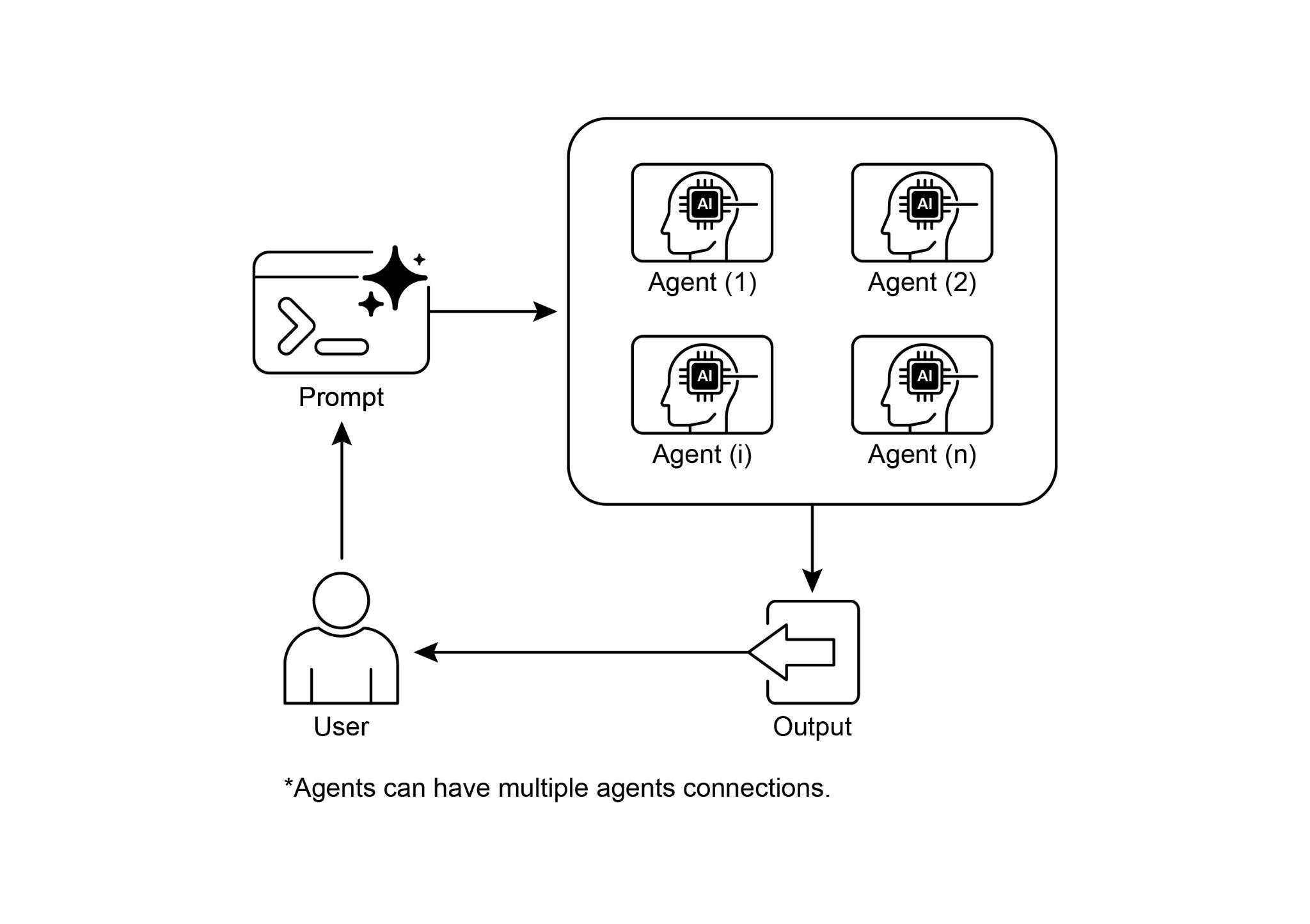
图 3:多智能体协作设计模式。
要点
- 多智能体协作指多个智能体围绕同一目标协同工作。
- 该模式依托角色专精、任务的分布式划分以及智能体之间的通信机制。
- 协作可以表现为顺序交接、并行处理、辩论共识或层级结构等多种形式。
- 它尤其适合需要多元专长或包含多个清晰阶段的复杂问题。
结语
本章梳理了多智能体协作模式,说明在系统中编排多名专精智能体所能带来的收益,并回顾了多种协作拓扑,凸显该模式在应对跨领域、多侧面复杂问题时的核心价值。理解智能体之间如何协作,也自然会引出另一个问题:它们究竟如何与外部环境交互。